
Summary
- SharePoint Copilot is an AI assistant (powered by GPT-4) that creates SharePoint sites, templates, and content from simple text prompts. It also integrates existing documents (Word, PowerPoint) to populate sites automatically.
- Key benefits: Speed (sites in minutes), consistent branding, easy customization, and seamless integration with Teams and Outlook.
- Potential pitfall: Content sprawl (too many unmanaged sites) – a solid governance strategy is essential. XferWorx offers SharePoint automation solutions to help you implement Copilot effectively.
AI-driven solutions are transforming the way businesses work, and SharePoint is no exception. SharePoint Copilot makes site creation more accessible by allowing users to generate templates with minimal input. With a simple prompt, Copilot handles the heavy lifting, saving your team valuable time.
The introduction of this SharePoint feature has revolutionized the way organizations create and manage SharePoint sites, making it easier than ever to get started on new projects. If you’ve ever wondered, “Can Copilot create a SharePoint site?” The answer is yes. Read this post and find out how you can leverage Copilot for SharePoint and SharePoint automation solutions to build templates and automate site creation.
What Is SharePoint Copilot?
SharePoint Copilot is an AI-powered assistant integrated within SharePoint that leverages Microsoft’s Copilot platform and large language models to help generate content and streamline site creation, powered by OpenAI’s GPT-4. It works by combining Microsoft Graph data with your organization’s business-specific data to generate relevant, personalized content. Whether you need to create a new onboarding site, build a knowledge repository, or set up a team collaboration hub, Copilot can generate it with just a few words.
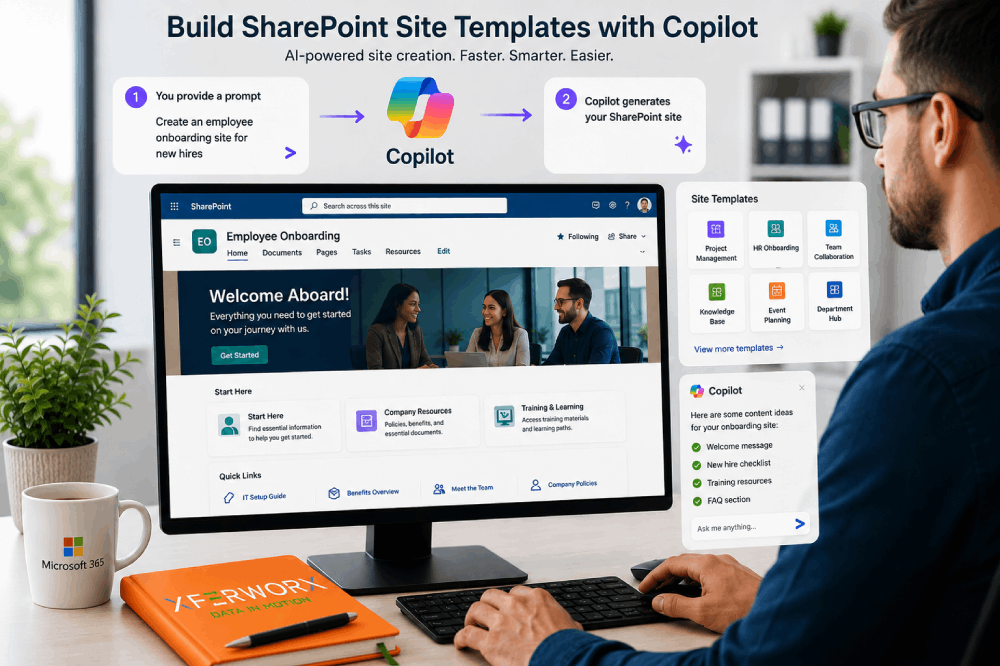
With Copilot for SharePoint, users can accelerate site creation by describing what they want in natural language. For example, a prompt such as “Create an employee onboarding site for new hires” can generate page layouts, draft content, and site design recommendations based on the request. Depending on your organization’s Microsoft 365 licensing and the Copilot features available in your tenant, Copilot may also assist with site setup and content generation, allowing users to customize the final site before publishing. Accelerate site creation by describing what they want in natural language. For example, “Create an employee onboarding site for new hires” results in Copilot automatically building a SharePoint site with pre-configured sections, layouts, and content. This AI-driven approach makes it incredibly easy to scale content creation while maintaining consistency across the organization.
How Copilot Can Streamline Your SharePoint Site Creation Process
SharePoint site creation has always been a manual, time-consuming process. Copilot changes that by automating much of the work. The system’s flexibility and user-friendly interface ensure that creating SharePoint templates is fast and easy. Here’s how it works:
- Create sites with minimal input. Simply enter a prompt, and Copilot automatically generates a site based on your request. For example, you could ask Copilot to build a site using an existing PowerPoint presentation, and it will populate the SharePoint site with information from that presentation.
- Integrate existing content. Copilot allows you to use your existing documents, such as Word files or PowerPoint slides, to create SharePoint sites. It automatically pulls relevant data and formats it into the site template, saving you time on manual entry.
- Generate content automatically. Struggling with writer’s block? Copilot can create content directly within the SharePoint site, from descriptions to instructions, ensuring consistency in style and tone.
- Customize site templates. Copilot doesn’t just generate basic sites; it customizes templates to suit your needs. You can tailor content to fit different departments, goals, and workflows, ensuring each site is relevant to your organization’s specific requirements.
Leveraging Copilot for SharePoint makes your workflow more efficient and helps your team avoid repetitive tasks, freeing up time for higher-impact work.
The Benefits of Using SharePoint Automation Solutions
At XferWorx, we specialize in SharePoint automation solutions that streamline your SharePoint environment. SharePoint automation reduces manual effort, automates repetitive tasks, and improves data accuracy. With Copilot for SharePoint, these benefits are multiplied as AI helps create and manage SharePoint sites effortlessly.
Automating the SharePoint content creation process helps organizations save time, reduce human error, and scale their operations more effectively. Learn more about SharePoint automation solutions from XferWorx and see how we can optimize your SharePoint environment for greater productivity and efficiency.
Why Copilot Is a Gamechanger for SharePoint Site Templates
With Copilot for SharePoint, the process of creating site templates is revolutionized. Here are the main reasons why this tool stands out:
- Speed and efficiency. Creating SharePoint sites used to be a lengthy process. With Copilot, organizations can significantly reduce the time required to create site templates and supporting content, organizations can significantly reduce the time required to create SharePoint site templates.
- Consistent branding and design. Copilot can help improve consistency by leveraging existing site structures, content patterns, and organizational standards, although governance and template management remain important can help improve consistency by leveraging existing site structures, content patterns, and organization.
- Easy customization. Copilot adapts to your organization’s needs, allowing for personalized content and layouts. It offers flexibility in how you create and organize SharePoint sites, so you can tailor them to suit your workflow.
- Streamlined integration. Copilot works with other Microsoft 365 applications such as Teams, Outlook, and Viva to improve collaboration and content accessibility across the Microsoft ecosystem applications such as Teams, Outlook, and Viva to help improve collaboration and content accessibility.
Potential Pitfalls of Using Copilot for SharePoint
Although Copilot for SharePoint offers many benefits, there are a few challenges to consider. Increased site creation could lead to content sprawl if not carefully managed. With more sites being created automatically, the risk of duplicate content and unstructured data increases, potentially making it difficult for users to find relevant information.
To prevent this issue, a solid SharePoint provisioning strategy is key. IT teams should set clear guidelines for site creation and ensure users have the proper permissions and access. This helps maintain control over the content being created and ensures it aligns with organizational goals.
How XferWorx Can Support Your SharePoint Strategy
SharePoint Copilot has transformed the way organizations create and manage their SharePoint sites. The AI-powered tool simplifies the process, saving time and reducing errors. While Copilot brings incredible benefits, it’s important to use it alongside a comprehensive strategy for managing content. XferWorx helps you make the most of Copilot for SharePoint with automation solutions tailored to your needs.
At XferWorx, we are experts in SharePoint automation and can help your organization fully leverage Copilot for SharePoint. Our automation-first approach focuses on streamlining workflows, improving data visibility, and reducing human error. With our support, you can implement a tailored SharePoint solution that works for your unique needs and ensures a seamless user experience.
We understand the importance of a well-optimized SharePoint environment and offer customized solutions to help you get the most out of your SharePoint investment. With us, your SharePoint deployment becomes efficient, scalable, and secure. If you’re ready to optimize your SharePoint environment with Copilot for SharePoint and automation, reach out to XferWorx today.
FAQs
Can Copilot create a SharePoint site?
Yes. With a simple text prompt (e.g., “Create a project management site for the marketing team”), SharePoint Copilot automatically generates a complete site including sections, layouts, and relevant content. You can also use existing documents like PowerPoint presentations or Word files to populate the site.
How does SharePoint Copilot differ from Microsoft 365 Copilot?
Microsoft 365 Copilot works across Word, Excel, Outlook, Teams, and SharePoint. SharePoint Copilot is specifically focused on automating SharePoint site creation, template generation, and content population. Think of SharePoint Copilot as a specialized tool within the broader Copilot ecosystem.
What are the potential downsides of using Copilot for SharePoint?
The main risk is content sprawl. As Copilot makes site creation so fast and easy, organizations may end up with too many unmanaged, duplicate, or unstructured sites. This can make it difficult for users to find relevant information. A solid SharePoint provisioning strategy and clear governance guidelines are essential.
Can I customize the templates Copilot creates?
Yes. Copilot generates customized templates that you can further tailor to fit different departments, goals, and workflows. You can adjust layouts, branding, content, and permissions to ensure each site meets your organization’s specific requirements.
How can XferWorx help with SharePoint Copilot?
XferWorx specializes in SharePoint automation solutions that complement Copilot. They help organizations implement a tailored SharePoint strategy, prevent content sprawl, improve data visibility, and streamline workflows using an Automation-First Approach. Their team ensures your SharePoint deployment is efficient, scalable, and secure.