
Quick Summary
Microsoft Teams SharePoint integration creates a powerful collaboration environment that combines communication, document management, and information sharing within the Microsoft 365 ecosystem. While Teams serves as the communication hub, SharePoint provides the underlying infrastructure for file storage, content management, and data organization. Understanding how these platforms work together can help organizations improve collaboration, increase productivity, and unlock greater value from their Microsoft 365 investment.
Microsoft Teams SharePoint integration is one of the most valuable capabilities within Microsoft 365. Many organizations use Microsoft Teams every day for meetings, messaging, and collaboration without realizing that SharePoint plays a critical role behind the scenes.
When users create teams, share files, or collaborate on documents, SharePoint is often handling the content management and storage functions that make those activities possible. Rather than operating as separate platforms, Teams and SharePoint are designed to work together as a connected system. Our Microsoft SharePoint services help organizations improve collaboration, streamline document management, and build a more efficient Microsoft 365 environment.
Understanding the Relationship Between Microsoft Teams and SharePoint
Microsoft Teams and SharePoint serve different but complementary purposes.
Microsoft Teams functions primarily as a communication and collaboration platform. It enables users to chat, host meetings, make calls, and collaborate in real time. Teams brings people together and creates a centralized space for conversations and teamwork.
SharePoint serves as Microsoft’s content management and document management platform. It stores files, organizes content, manages permissions, and provides the infrastructure necessary for enterprise information management.
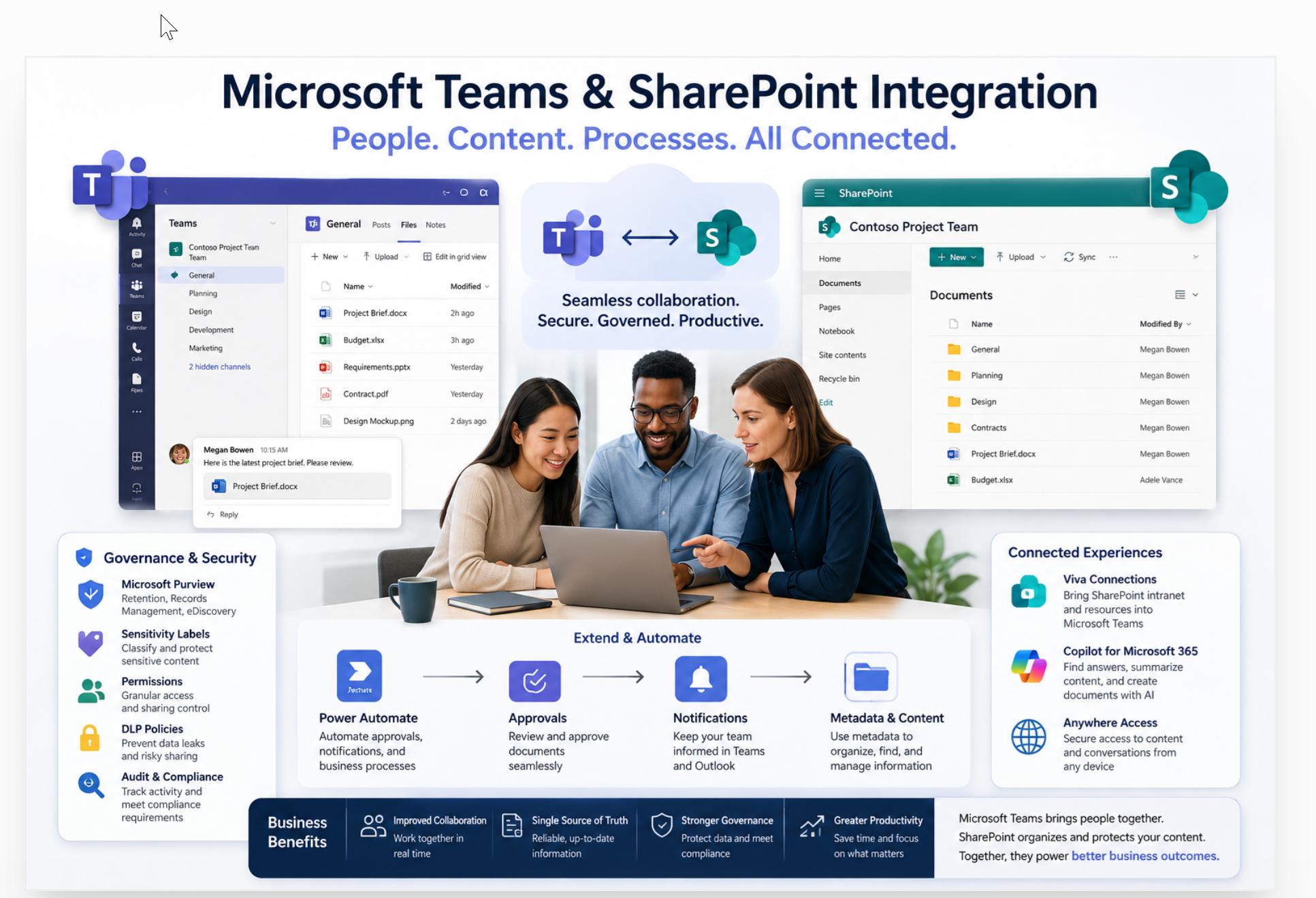
When an organization creates a new Team in Microsoft Teams, a corresponding SharePoint site is automatically generated in the background. This site becomes the central repository for files shared within that Team.
Standard channels store their files directly in the document library of this parent SharePoint site, keeping content organized in one central location. Private and shared channels follow a different pattern, since each channel type generates its own SharePoint site separate from the parent site tied to the Team.
This distinction matters for governance and permissions management. Files in private and shared channels follow access rules that differ from those on the main Team site, and administrators need to track multiple sites rather than just one.
Backup, retention, and lifecycle planning depend on this structure too, since policies applied to the parent site do not automatically extend to the additional sites created by private and shared channels.
As a result, users experience seamless collaboration in Teams while SharePoint manages the content behind the scenes.
How File Management Works Between Teams and SharePoint
One of the most important aspects of Microsoft Teams SharePoint integration is file management.
Users who upload files into a Teams channel find those files stored within the associated SharePoint document library. Teams provides a user-friendly interface for accessing and collaborating on those files.
This integration allows team members to edit documents simultaneously, track version history, and access files from multiple Microsoft 365 applications.
A project team working within Teams can upload proposals, spreadsheets, contracts, and presentations, for example. Team members can open those files directly from Teams. SharePoint manages storage, security, permissions, and version control behind the scenes.
This unified experience eliminates the need for duplicate file storage systems. Organizations maintain a single source of truth for important information.
SharePoint also includes several built-in tools that help teams recover from accidental changes, deletions, and user errors:
- Version history: Every saved change to a document creates a new version, so users can view or restore an earlier copy if a mistake gets introduced.
- Document recovery: Files that are edited incorrectly or overwritten can often be rolled back to a previous state without needing IT intervention.
- Recycle bin: Deleted files move into a two-stage recycle bin, giving users and admins a window of time to restore content before it is permanently removed.
These recovery features add a layer of protection to daily collaboration. Teams can work quickly without fear that a deleted file or an overwritten document results in permanent loss of important information.
Collaboration Benefits of Teams and SharePoint Integration
Organizations often struggle with disconnected communication and document management systems. Employees may communicate in one application while storing files in another, leading to inefficiencies and confusion.
Microsoft Teams and SharePoint address this challenge by creating a connected environment where communication and content coexist.
Employees can discuss projects within Teams while simultaneously accessing relevant files stored in SharePoint. Conversations remain connected to the documents and resources they reference, improving context and reducing time spent searching for information.
This integration also supports remote and hybrid work environments. Employees can access files, collaborate on documents, participate in meetings, and share knowledge regardless of location.
The result is improved productivity, faster decision-making, and stronger collaboration across the organization.
SharePoint’s Role in Governance and Security
Teams often receives attention for its communication features, but SharePoint delivers many of the governance and security capabilities that organizations rely on.
SharePoint provides advanced permission management, document retention policies, version control, compliance features, and content governance tools. These capabilities help organizations protect sensitive information and give employees access to the resources they need.
Microsoft Purview extends these governance tools further, adding several compliance capabilities that organizations commonly use alongside Teams and SharePoint:
- Retention policies: Organizations can set rules that retain content for a specified period or automatically delete it once that period ends, helping to meet legal and regulatory obligations.
- Sensitivity labels: Documents and emails can be labeled based on their level of confidentiality, automatically applying protections such as encryption or access restrictions.
- Data loss prevention (DLP): Policies can detect and block the sharing of sensitive information, such as financial records or personal data, before it leaves the organization.
- eDiscovery: Legal and compliance teams can search across Teams and SharePoint content to locate, preserve, and export information needed for investigations or litigation.
Businesses operating in regulated industries such as healthcare, government, construction, education, and professional services find these governance features especially valuable.
Teams relies on SharePoint for content storage, so organizations get enterprise-grade document management and compliance coverage without requiring users to leave the Teams environment. This combination of usability and governance makes Microsoft 365 an attractive option for organizations that need collaboration tools and strong control over their information.
Creating Intranets and Knowledge Hubs
Another major advantage of Microsoft Teams SharePoint integration is the ability to connect collaboration with organizational knowledge.
SharePoint enables businesses to create intranet portals, knowledge bases, policy libraries, and employee resource centers. Teams can then serve as the gateway that connects users to these resources.
Employees can access company announcements, training materials, procedures, and business documentation directly through Teams while the underlying content remains organized and managed within SharePoint.
Microsoft offers Viva Connections as a dedicated way to surface this SharePoint intranet content inside Teams, giving employees a single destination for company information without switching applications. Through Viva Connections, organizations can:
- Display a personalized dashboard: Employees see relevant news, tasks, and resources pulled directly from SharePoint.
- Surface the company intranet as a Teams app: The full SharePoint intranet experience becomes accessible from within Teams, including navigation and branding.
- Deliver targeted content: Announcements and resources can reach specific teams, departments, or locations based on how SharePoint content is organized.
This improves information accessibility and helps eliminate data silos that often hinder productivity.
Organizations that invest in structured knowledge management often experience improvements in employee onboarding, operational consistency, and organizational learning.
Why Businesses Benefit from Microsoft Teams SharePoint Integration
The true strength of Microsoft Teams SharePoint integration lies in its ability to connect people, content, and processes.
Teams facilitates communication and collaboration. SharePoint provides content management and governance. Together, they create a unified digital workplace that helps drive productivity, knowledge sharing, and operational efficiency.
Many organizations reduce their reliance on separate platforms for communication, document management, and information access by adopting this connected ecosystem. Some organizations still need specialized business applications, records management systems, ERP platforms, or industry-specific solutions alongside Microsoft 365, particularly when regulatory requirements or unique operational needs call for dedicated tools.
Teams and SharePoint can work alongside these systems rather than replace them entirely, serving as the collaboration and content layer that connects people to information across the broader technology environment.
Common Governance Mistakes to Avoid
Organizations that grow their Teams and SharePoint usage without a governance plan tend to run into predictable problems. These issues become harder to fix the longer they go unaddressed:
- Uncontrolled Team creation: Employees create new Teams for every project or conversation, leading to duplication and confusion about which Team owns which information.
- Inconsistent naming standards: Teams and sites get named without a pattern, making search and navigation difficult across the organization.
- Orphaned Teams: Projects end, or employees leave, and their Teams remain active with no owner responsible for managing content or access.
- Excessive permissions: Users get granted broader access than their role requires, increasing the risk of data exposure.
- Unmanaged site sprawl: The number of SharePoint sites grows unchecked, making it difficult for IT to track storage, security, and compliance across the environment.
A governance plan that addresses naming conventions, Team lifecycle management, and periodic access reviews helps organizations avoid these pitfalls before they become larger problems.
Automating Workflows with Power Automate
Power Automate extends the value of Teams and SharePoint by connecting content to business processes. Common examples include:
- Document approvals: A file uploaded to a SharePoint library triggers an approval request, routing it to the appropriate reviewer and notifying them directly in Teams.
- Notifications: Changes to a document, list item, or metadata field send automatic alerts to relevant team members, keeping everyone informed without manual follow-up.
- Metadata-driven processes: Updates to a metadata field, such as marking a contract as “Ready for Review,” can trigger a defined workflow without any manual handoff.
- Business workflows surfaced in Teams: Approval requests, task assignments, and status updates generated from SharePoint appear directly within Teams channels or chats, so employees do not need to check a separate system.
These automations reduce manual work and keep information moving through the organization on a predictable path.
Ready to unlock the full potential of Microsoft Teams and SharePoint? XferWorx helps organizations modernize collaboration, improve document management, automate workflows, and create connected Microsoft 365 environments that support operational excellence.
Contact XferWorx today to discover how a tailored SharePoint strategy can help mobilize your data and improve business performance.
FAQs
What is Microsoft Teams SharePoint integration?
Microsoft Teams SharePoint integration connects Teams collaboration features with SharePoint document management capabilities. Files shared in Teams are stored and managed through SharePoint, creating a seamless collaboration experience.
Does Microsoft Teams store files in SharePoint?
Yes. Files shared within Teams channels are stored in the associated SharePoint site document library. Teams acts as the interface while SharePoint handles storage and content management.
Why is SharePoint important for Microsoft Teams?
SharePoint provides document storage, version control, permissions management, compliance capabilities, and content governance. These features support many of the file-sharing and collaboration functions available in Teams.
Can SharePoint and Teams improve business productivity?
Yes. Combining communication, document management, and workflow automation lets organizations streamline collaboration, improve information access, reduce manual work, and increase overall productivity.
Organizations see the greatest productivity gains when they pair this technology with governance, information architecture, metadata planning, and user adoption strategies. The technology alone provides the tools. However, people need training, clear processes, and well-organized content to get the most value from them.